🚀 Getting Started
Welcome to Color Connect 3D.
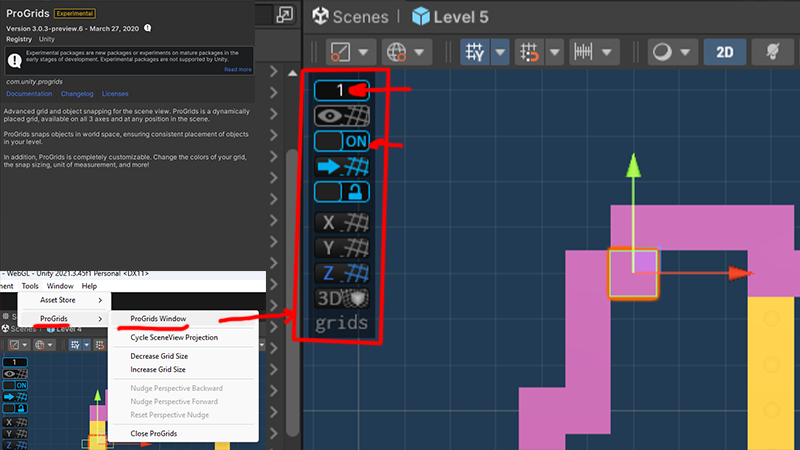
Install ProGrids (Recommended)
- Open Window → Package Manager → click “+” → Add package by git URL and paste:
com.unity.progrids - Documentation: ProGrids (com.unity.progrids)
- Enable grid snapping to build new levels quickly and precisely. Levels are composed of cubes aligned to integer positions.
Demo Scene | Try Demo Scene WebGL
Open the Demo Scene in Unity to see a ready setup with all systems connected:
Assets/Fly Studios Games/Color Connect 3D/Demo Scene/Color Connect 3D Demo.unity
🧱 Level Creation
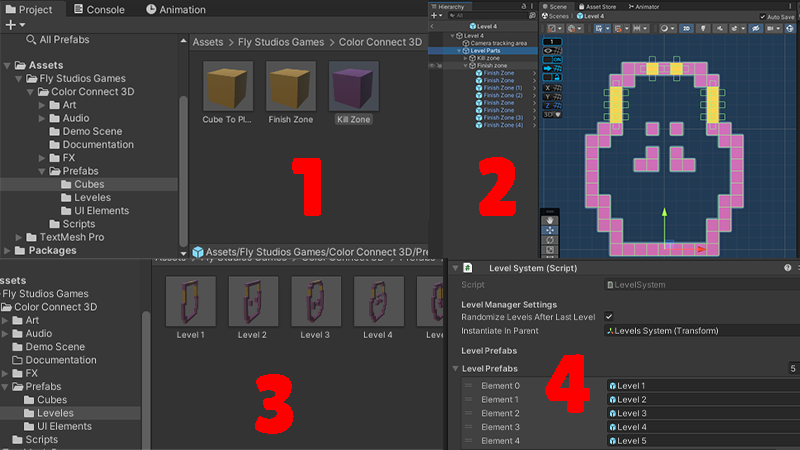
Levels are instantiated via LevelSystem using prefabs. Build your levels with cubes snapped to the grid using ProGrids for best results.
Configure LevelSystem
- Assign
instantiateInParent— container where level prefabs are spawned. - Populate
levelPrefabswith your level setups. - Enable
randomizeLevelsAfterLastLevelto shuffle levels after the final one.
Grid Tips
- Use ProGrids snap to 1-unit increments to align cubes perfectly.
- Avoid placing cubes at
y == 0if that represents invalid ground in your setup (used by IsPositionEmpty).
🎥 Camera & Bounds
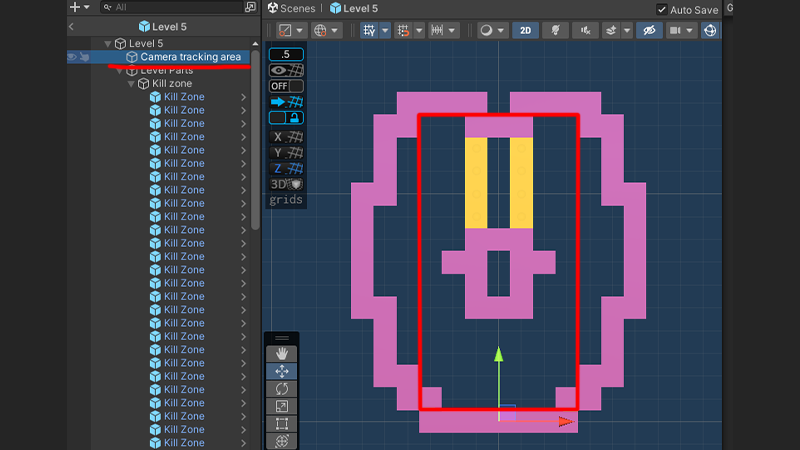
CameraMargins + CameraFollow
- Add
CameraMarginsto a GameObject withPolygonCollider2Dto define camera movement area. - Add
CameraFollowto your Camera, settarget,initialOffset,smoothTime, andpaddingOffset. - CameraFollow clamps position within the PolygonCollider2D bounds.
Tags & Layers
- Set
killZoneTagandwinZoneTagon relevant trigger colliders. - Configure
encouragingTextHitLayerMaskto include the layers you want the rays to detect.
❤️ Support |
For issues or requests, contact flystudiosgames@gmail{dot}com. Share screenshots of your editor setup and inspector values when reporting bugs.